Features
Everything your books need, in one quiet place.
From the first bill to the last VAT return. Here is what afnoCA does for you, feature by feature.
Chat entry
Type what happened. It becomes an entry.
Write a sale, an expense or an investment the way you would tell a colleague, in English, Hindi or Nepali. Or send a photo of the bill. afnoCA prepares the entry and you check it before anything is saved.
- English, Hindi and Nepali
- Bill photos read for you
- Nothing is saved until you press Save
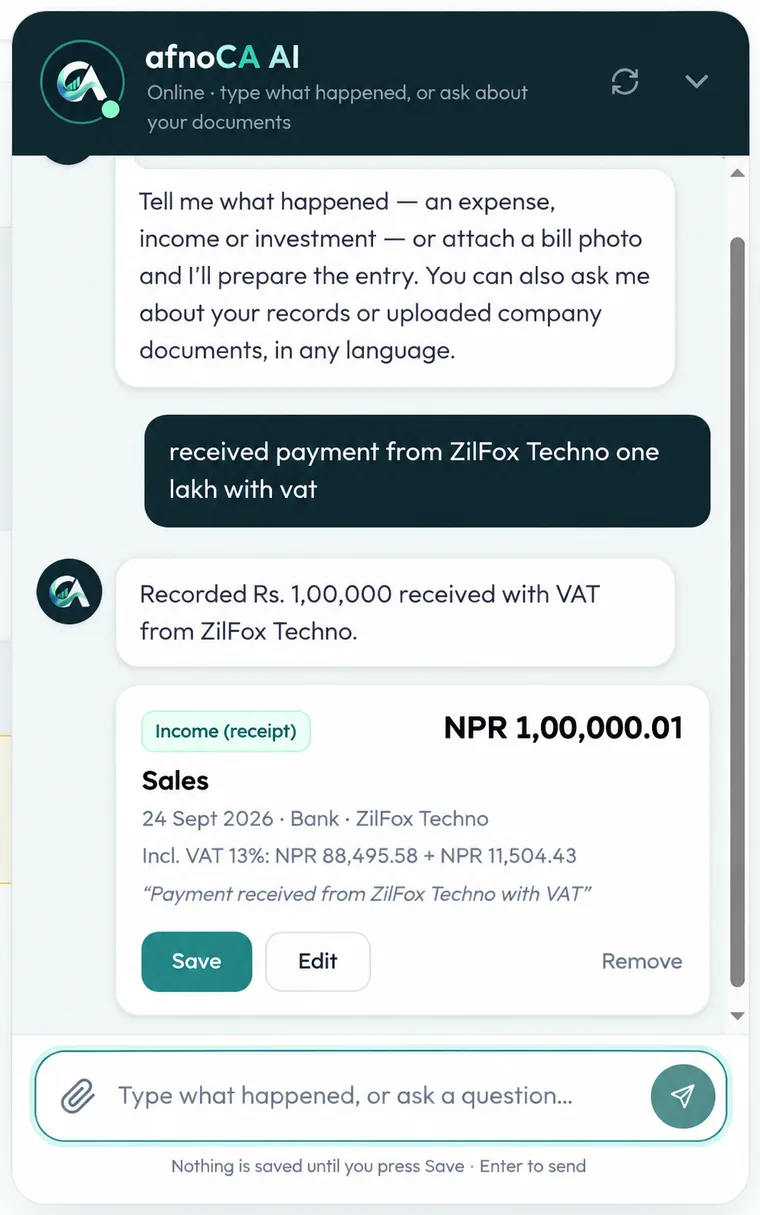
An example conversation Nepal VAT
13% VAT and PAN/VAT bills, built in.
Sales and purchase entries carry the right side of VAT, the 13% is worked out for you, and your VAT position stays up to date as you go, instead of arriving as a surprise at filing time.
- 13% VAT worked out
- PAN and VAT bill details
- Sales and purchase VAT kept apart
Invoices and estimates
Bill your customers and get paid.
Create invoices and estimates, email them with a link the customer can open without logging in, and record payments as they arrive. Paid, part-paid and overdue are worked out from the payments, never typed in by hand.
- Emailed with a view link
- Recorded payment by payment
- Amount in words, in NPR
Bills to pay
Know what you owe, and when.
Keep your vendors’ bills and part-payments in one place, so nothing is paid late, or paid twice.
- Vendor bills and payments
- Due dates and overdue bills
- Tied to your ledger
Customers and vendors
Everyone you do business with, in one list.
Keep customers and vendors in one place and link them to invoices, bills and entries, so each name means the same person everywhere.
- Customers and vendors
- Linked to invoices and bills
- Reused across entries
Company records
Your official documents, and answers from them.
Upload your registration and PAN/VAT certificates, licences and contracts. afnoCA reads them, even scans, and answers your questions with the document and page each answer came from.
- PDFs and photos
- Answers name the document and page
- Newer versions replace older ones
Proof on every entry
Attach the bill to the entry.
Add a photo or PDF to any transaction, so the paper trail sits right beside the number it explains.
- Photo or PDF
- View, replace or remove
- Kept privately with your books
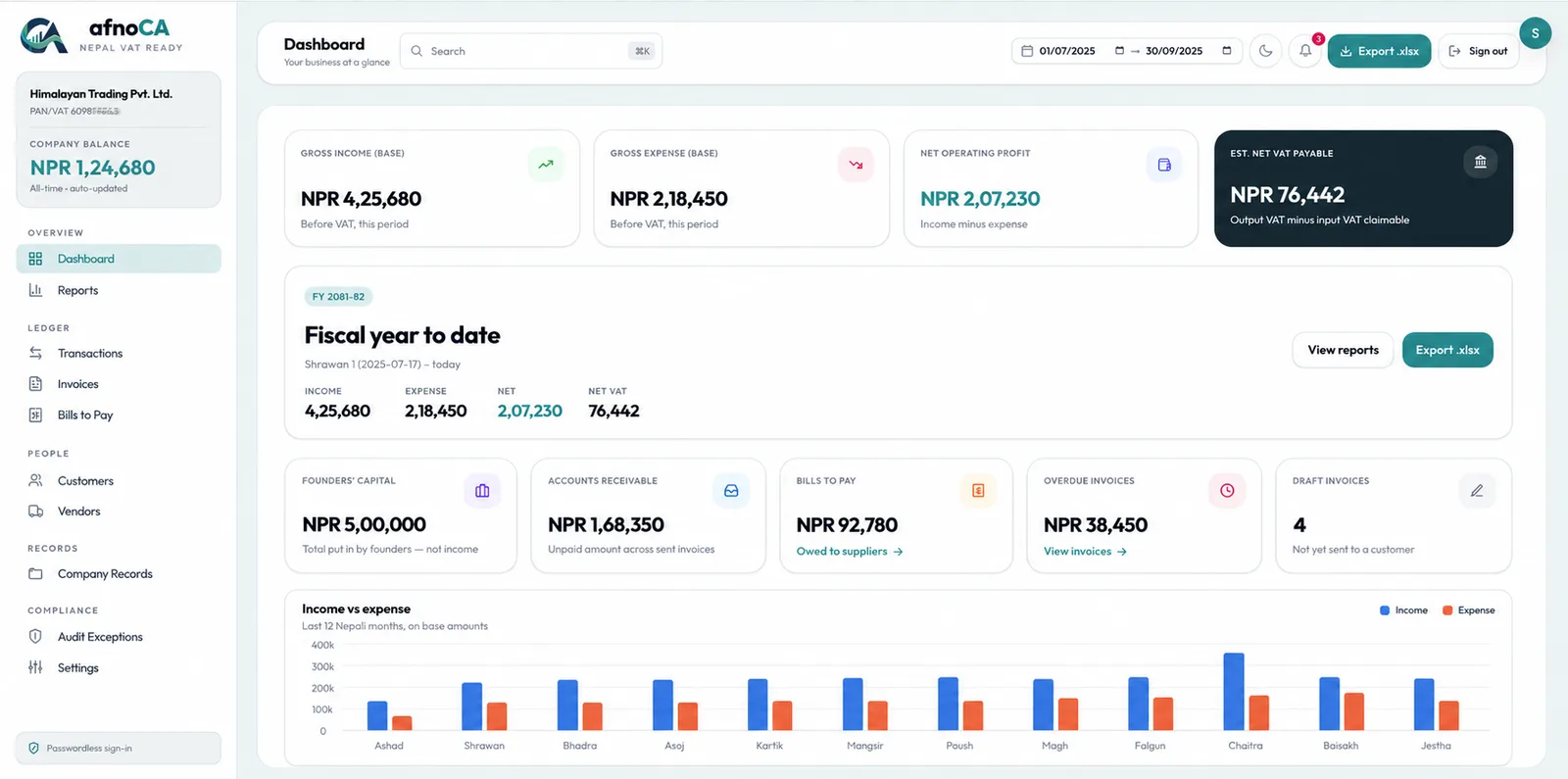
Dashboard and CA package
See the whole picture. Hand it to your CA.
A dashboard for income, expenses, balance and VAT, by Bikram Sambat fiscal year, and a one-click Excel package that your CA can work from.
- Dashboard and reports
- Export to Excel (.xlsx)
- Bikram Sambat fiscal periods
Sample data Audit exceptions
Spot what looks wrong before your CA does.
afnoCA flags entries that need a second look, so mistakes are fixed while you still remember what happened.
- Flags entries that need a look
- A running count in the menu
- Fix them at the source
VAT books
Sales and purchase registers for your VAT return.
Month by month registers of every sale and purchase with its bill number, PAN and VAT, matched against the figures on your dashboard so a difference is explained before you file.
- Sales and purchase registers
- Reconciled to your dashboard
- Excel export for your CA
TDS register and deadlines
Tax deducted, and when it is due.
Record tax deducted at source at the current rates, see what has been deposited and what has not, and keep the 25th-of-the-month VAT and TDS dates, advance tax and the annual return in front of you.
- Rates for rent, contracts, services and more
- Deposited or overdue, at a glance
- Filing dates in Bikram Sambat
Customer and supplier statements
Who owes what, line by line.
A statement for any customer or supplier: what was billed, what was paid and what is still owed, with a running balance, for any period. Download it as Excel.
- Opening balance and running balance
- Any period
- Excel download
Staff logins
Let your team enter the books.
Add staff with their own username and emailed code. They can do the everyday bookkeeping; settings and closing a period stay with you, and every change is recorded under the name of the person who made it.
- Their own sign-in
- Settings stay with the owner
- Every change carries a name
Audit trail
A permanent record of every change.
Who added, changed or deleted what, and when, written by the database itself so it cannot be edited afterwards. When an auditor asks who changed this, the answer is already there.
- Before and after, for every change
- Cannot be edited or erased
- Search by person, date or record
Audit pack
Everything an auditor asks for, in one download.
One ZIP for the year: the transactions, the findings with your accountant’s notes, the TDS register and the change history, with a note on how to read them.
- One click, one file
- Findings with review notes
- Change history included
A login for your CA
View-only, so they can look but never change.
Give your accountant their own sign-in. They can see and download everything and write review notes on audit findings, and nothing else. No more emailing spreadsheets back and forth.
- View and download only
- Can write review notes
- Switch off any time
Ask your books
Questions answered from your own numbers.
Ask “how much VAT this month?” or “who owes me money?” in plain words. The answer is worked out from your real entries, with the same totals your dashboard shows.
- Totals from your real entries
- Same numbers as the dashboard
- Ask in any language
See it with your own numbers.
Sign in and add your first entry. It takes one sentence.