How it works
From “I sold something” to books your CA will thank you for.
Four steps, and most of the work happens in the second one: saying what happened.
- 1
Sign in with a code, not a password
Enter your username. afnoCA emails a six-digit code to the address on your account. Type it in and you are signed in. There is no password to remember, and none to lose.
The code works once and expires in ten minutes.
- 2
Tell it what happened
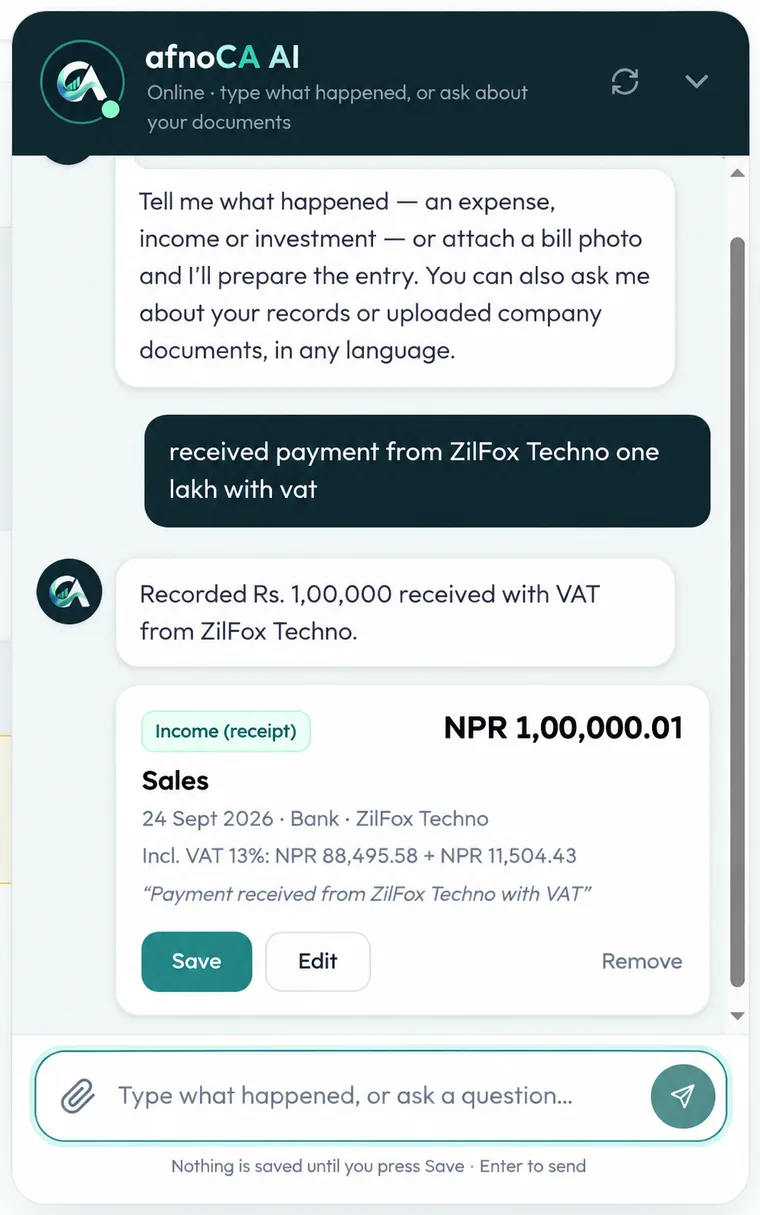
Write a sale, an expense or an investment the way you would say it, in English, Hindi or Nepali. Or attach a photo of the bill and let afnoCA read it.
No forms to fill in, no accounting terms to know.
- 3
Check it, then save
afnoCA turns your message into a proper entry with the amount, the party and the 13% VAT worked out. You read it, fix anything that is off, and only then press Save.
Nothing goes into your books until you say so.
- 4
Stay ready for filing
Entries flow into your ledger, dashboard, invoices, bills and VAT position, by Bikram Sambat fiscal year. When your CA asks for the books, export a package in one click.
Ask questions about your numbers, or your documents, any time.
Put your books in order.
Sign in, tell afnoCA what happened, and let it keep the rest tidy.